Tune In to
Your Brain’s Potential.

Brain Signals with David Ims, LCPC —a new podcast and webinar series exploring how neuroregulation and brain retraining sharpen focus, balance emotion, and transform mental well-being.

Find us on your favorite podcast platform.

Meet your Host

David Ims, LCPC

“Your brain signals offer a roadmap to deeper self-understanding. On Brain Signals, we explore how retraining your brain empowers you to strengthen mental resilience, optimize daily functioning, and take control of your health.”

Scroll to Top

Are you having problems clicking next on the membership form?

You must have 3rd party cookies set to “Always Accept.”

Internet Explorer 7 on Windows

  • Click the “Tools” menu
  • Click “Internet Options”
  • Select the “Privacy” tab
  • Option 1: To enable third-party cookies for all sites
  • Click “Advanced”
  • Select “Override automatic cookie handling”
  • Select the “Accept” button under “Third-party Cookies” and click “OK”

Firefox 3 on Windows

  • Click the “Tools” menu
  • Click “Options…”
  • Select the “Privacy” menu
  • Make sure “Keep until” is set to “they expire”
  • Option 1: To enable third party cookies for ALL sites: Make sure “Accept third-party cookies” is checked

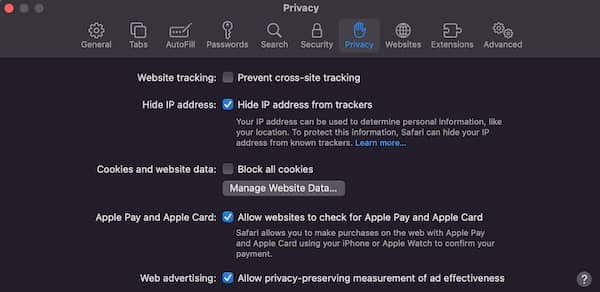
Safari on Apple OS X:

  • Click the “Safari” menu
  • Click “Preferences…”
  • Click the “Security” menu
  • For “Cookies and website data” unselect “Block all cookies”
  • For “Website tracking”, unselect “Prevent cross-site tracking”
Safari enable cookies for membership purchase.

Firefox 3 on Apple OS X:

  • Click the “Firefox” menu
  • Click Preferences…
  • Click the Privacy menu
  • Make sure “Keep until” is set to “they expire”
  • Option 1: To enable third-party cookies for ALL sites: Make sure “Accept third-party cookies” is checked

Google Chrome on Windows

  • Select the Wrench (spanner) icon at the top right
  • Select “Options”
  • Select the “Under the Hood” tab
  • Select “Allow all cookies” under “Cookie Settings” and click “Close”

Internet Explorer 6 on Windows

  • Click the “Tools” menu
  • Click “Internet Options”
  • Select the “Privacy” tab
  • Move the settings slider to “Low” or “Accept all cookies”
  • Click “OK”

Opera 9 on Windows

  • Click the “Tools” menu
  • Click “Preferences…”
  • Click the “Advanced” tab
  • Select “Cookies” on the left list
  • Make sure “Accept cookies” is selected and uncheck “Delete new cookies when exiting Opera”
  • Click “OK”