
How Brain Nutrition Supports Neuro Modulation Efficacy presented by Christina Veselak, CN, LMFT

How Brain Nutrition Supports Neuro Modulation Efficacy presented by Christina Veselak, CN, LMFT

WEBINAR: How Brain Nutrition Supports Neuro Modulation Efficacy presented by Christina Veselak, CN, LMFT+

Friday, October 16, 2026 at 12:00 noon Eastern time (this is a 90-minute webinar)

1.5 Neuroregulation CE credits are available for purchase when attending the live presentation in its entirety.

For more information and to register, click HERE.

Description:

This workshop explores how targeted brain nutrition can support brain function and complement neuro modulation approaches. The session focuses on the nutritional building blocks required for healthy neurotransmitter production and the role that adequate protein and amino acids can play in supporting mood, cognitive function, nervous system regulation, and recovery.

Participants will be introduced to amino acid therapy and the relationship between specific amino acids and key neurotransmitter systems, including serotonin, GABA, endorphins, and catecholamines. The workshop will also address blood glucose stability and the practical importance of consuming adequate protein approximately every four hours to provide the brain and body with consistent nutritional support.

The session provides practical strategies for integrating brain nutrition and amino acid therapy into a broader approach to mental health and addiction recovery, while examining how nutritional support may help establish a stronger physiological foundation for neuro modulation interventions.
Scroll to Top

Are you having problems clicking next on the membership form?

You must have 3rd party cookies set to “Always Accept.”

Internet Explorer 7 on Windows

  • Click the “Tools” menu
  • Click “Internet Options”
  • Select the “Privacy” tab
  • Option 1: To enable third-party cookies for all sites
  • Click “Advanced”
  • Select “Override automatic cookie handling”
  • Select the “Accept” button under “Third-party Cookies” and click “OK”

Firefox 3 on Windows

  • Click the “Tools” menu
  • Click “Options…”
  • Select the “Privacy” menu
  • Make sure “Keep until” is set to “they expire”
  • Option 1: To enable third party cookies for ALL sites: Make sure “Accept third-party cookies” is checked

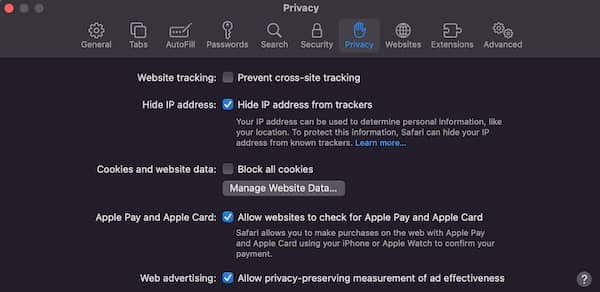
Safari on Apple OS X:

  • Click the “Safari” menu
  • Click “Preferences…”
  • Click the “Security” menu
  • For “Cookies and website data” unselect “Block all cookies”
  • For “Website tracking”, unselect “Prevent cross-site tracking”
Safari enable cookies for membership purchase.

Firefox 3 on Apple OS X:

  • Click the “Firefox” menu
  • Click Preferences…
  • Click the Privacy menu
  • Make sure “Keep until” is set to “they expire”
  • Option 1: To enable third-party cookies for ALL sites: Make sure “Accept third-party cookies” is checked

Google Chrome on Windows

  • Select the Wrench (spanner) icon at the top right
  • Select “Options”
  • Select the “Under the Hood” tab
  • Select “Allow all cookies” under “Cookie Settings” and click “Close”

Internet Explorer 6 on Windows

  • Click the “Tools” menu
  • Click “Internet Options”
  • Select the “Privacy” tab
  • Move the settings slider to “Low” or “Accept all cookies”
  • Click “OK”

Opera 9 on Windows

  • Click the “Tools” menu
  • Click “Preferences…”
  • Click the “Advanced” tab
  • Select “Cookies” on the left list
  • Make sure “Accept cookies” is selected and uncheck “Delete new cookies when exiting Opera”
  • Click “OK”